Wednesday, April 25, 2012

Class Reflection 04-18-12

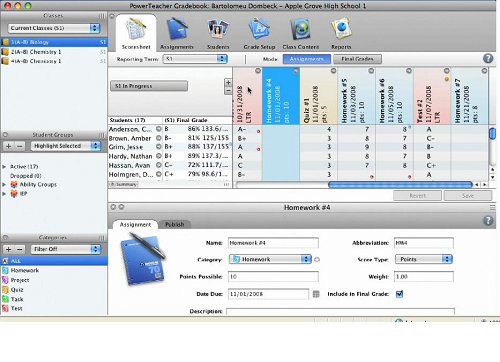
Divided into different groups, we conducted some research and a small presentation on classroom tools. Our group's focus was on grading software. Out of the two software we covered, Pearson's PowerTeacher software stuck out to me the most.

I loved the comprehensiveness of the software, the clean layout, and the ability to develop students' reports with great ease. To top it off, I was glad to see that it was a webtool and not a physical software. This meant that this grading tool could be used anywhere Internet and a computer is available. 

However, the lack of a price tag on the company's website made it seem intimidating. To me a lack of a price tag meant a hefty price. If any of you viewers know the price of the Pearson PowerTeacher app, please leave me a message in the comments. Thanks!


Class Reflection 04-11-12

For this week's class we focused on the many social communication tools found online. Collectively the class created a laundry list of apps and their uses. Then, the class came up the uses of each communication tool in the classroom.

After completing this task as a class, we focused on Twitter in particular. When Ed saw the small amount of hands being raised after asking "Who uses Twitter", I wasn't surprised. While it is a very useful communication tool, I think many people find it overwhelming because of the growing number of social media tools online. Also compared to other social media outlets like Facebook, it is on the lower-end in terms of features.

I think most users want the ability to add more media to their posts. But, Twitter only offers text and links to the full article or video.  

Wednesday, March 7, 2012

Class Reflection: 02-29-12

Adobe Connect


The Adobe Connect video conferencing class was by far the coolest class I had at Rutgers University. During the entire session, I couldn't stop typing "This is awesome!" The Youtube walk through on Adobe Connect made the online software more complicating than it really was. Once I started using Connect, it seemed very straightforward and user friendly. The interactive gesture menu was the most interesting. Raising hands, applauding, and other communication gestures reminded me of the World of Warcraft gestures found in the game.

Of course like all software, it had some shortcomings which I witnessed in person. The biggest shortcoming I noticed was connectivity. There were many connectivity issues that arose during the entire class. While working on the group assignment, Mario had issues staying connected. He would chime in for a few moments, and then get disconnected.

Overall interface was simple to navigate through, but I found it difficult to share my screen. After fiddling with the controls for some time, I gave up and decided to recite my points instead. This was unfortunate.  


Wednesday, February 29, 2012

Class Reflection 2-22-12

Video Editor from Hell


During my many years in front of the computer, I've never seen such a poor video editor until today. After being instructed to familiarize ourselves with the Youtube Editor during this week's DTSE lesson, Sari and I spent the rest of class filming and attempting to edit our video. The process couldn't have been more difficult.
We saw the warning signs of coming frustration when we saw the small amount of tutorials. The video tutorials were also very outdated. I had to relearn many of the functions when I got to the Youtube video editor. While the layout of the editor seemed pleasing to the eye, the frustration was lurking beneath it all. Importing and combining the videos were simple, changing the length of each clip was challenging. The old layout had small arrows to accurately lengthen and shorten each clip. The new layout relied on the users mouse movements. I found that this was more challenging because of my shaky hands.

Since my partner and I could not finish the editing process in class, I decided to include the final piece (the music) at home. But in order to save our work, we had to publish the video. This was a grave mistake. After taking a break for the day, I picked up the editing process the next morning. I perused through the long list of music tracks until coming across one that was suitable for the video. The importing of the track was simple. I had to click and drag the music to an area located underneath the clip section. But, I couldn't find any tools that would shorten or lengthen the music track. Thinking that I missed something in the tutorial video, I went back to the instructions in hopes of finding any steps on editing music tracks. Several tutorials later, I was stumped. I disappointingly allowed the track to play throughout the whole video. Much of the dialogue in the video was muffled by the background music. I vowed never to use this editor again.

Epic Physics Simulation


For my unit on Kinetic and Potential energy, I will be using a simple pendulum for the video demonstration. Before viewing the video, the simple pendulum simulation will give students an idea of how the mass on the tip of the pendulum reacts to various changes in speed, length of tether, and in different locations (ie Moon, Jupiter, and Planet X).

The option to see the reaction of the pendulum in different environments make this simulation epic. Also, the comprehensiveness of the simulation adds to the "wow" factor. You can see a definite quality in the animation and layout. On the top right corner, the buttons used to alter mass and length seems like something found in a music studio. Also, the ruler found on the right corner of the simulation allows the user to move it all over the viewing area.

It is difficult to find any shortcomings in this great simulation. I've never found such a comprehensive simulation. The main page is loaded with teaching materials and different translations for the simulations. Users can also download or embed it into a different website with ease. It is truly fun to use and very helpful as well. I hope you enjoy it as I have.


Tuesday, February 21, 2012

Class Reflection 02-15-12

With a previous lecture about wikis in a Journalism class, this week's lesson wasn't completely new to me. But, the lesson only added to a growing list of tech tools I can apply to my classroom. I forgot how simple it was to maintain and edit a wiki. Just like adding a blogger post, the tools provided for each posting was simple as well. So, it was easy to adjust and publish my first wiki page. Unlike blogger.com, it was disappointing to see that there was a limited amount of theme options in the settings section (not without a fee).

Publishing my teaching philosophy page for this week's assignment made me rethink and adjust my old teaching philosophy. Creating the wiki also made me feel official and more like an actual teacher than a student teacher. The ordered list requirement facilitated the viewing and understanding of my wiki post as well. While I haven't made big changes to the page, I started on making a personalized banner for my wiki homepage.

Stay tuned for more updates on my Wiki!


Wednesday, February 15, 2012

WebQuest Posting

My WebQuest document was first embedded as a PDF using ScribdDTSE_WebQuest_2012

Since Scribd converted all files to PDF, I found another nifty embedding online tool called Docstoc to upload my .DOCX file. DTSE_WebQuest_2012

Thursday, February 9, 2012

Class Reflection 02-08-12


This week's lesson reminded me of how much I didn't know about Google Docs and Microsoft Office. It also told me to be curious about the software and Google services that I use on a day-to-day basis. While I couldn't remember all the tutorials taught by each student in the class, it all came back to me with a brief self-refresher course at home.

Out of all the tools discussed in class, the forms tool and the bibliography tool were the ones I found most useful. I felt my tech savvy meter increase very slightly. Then all the past situations where these types of tools would have been useful, came rushing back to me. I got the same reaction after learning the bibliography lesson. All the term papers of my past could have been completed quickly, and with greater ease with such a knowledge.

To keep the trend of being more tech-curious I found a great website to share with my classmates. I found addictivetips.com to have a plethora of daily tutorials for both the Mac and PC user. The site contained tutorials like "Read Google Reader Feeds in Full Form" and "Convert Youtube Videos to MP3 Audio On Any Device". Most tutorials contained easy step-by-step instructions as well as clear images to follow along for the visual learner.

Check it out!

Tuesday, January 31, 2012

Class Reflection 01-25-12

Real Simple Syndication or RSS was the first term I learned during my first Demonstrations and Technology in Science Education class. While I had some experience with RSS feeds in the past, my interest for this type of technology was fleeting at best. So for memory sake, I took a brief trip down memory lane by logging into my old RSS reader to find a large collection of Japanese animation feeds that have accumulated over the years. After quickly sifting through the feeds, I figured out that I was interested in RSS feeds as a young high school student. It was good to see how connected I was several years ago.


After a lesson on RSS feeds, the class contributed in a list of new and old technologies found inside and outside the classroom. As a technology nut, I tried to remember all the tech articles I read in the past. Topics like 3D printers, voice recognition(iPhone 4S's Siri), and handwriting recognition technology came to mind. I initially tried to think of a teaching application for each piece of technology. But, after a few contributions to the technology list, I just started mentioning general technology.

While the professor was grouping the technology list into sub-groups I noticed how he emphasized efficiency above all other types of categories. I came to realize why this emphasis on efficiency was so obvious. With only a small amount of time allocated to teaching each class, efficiency was key in the average classroom. So, I started forming a small list of some of the efficiency gadgets and Internet tools found on the board in hopes of using them myself someday.

As a tech nut, this class seems promising. In the coming weeks, I hope to get a first hand experience on newer and newer pieces of educational technology. Overall, some more experience with the smart board would be very helpful. I'm just going to have to wait and see what this class has to offer.